
POS register
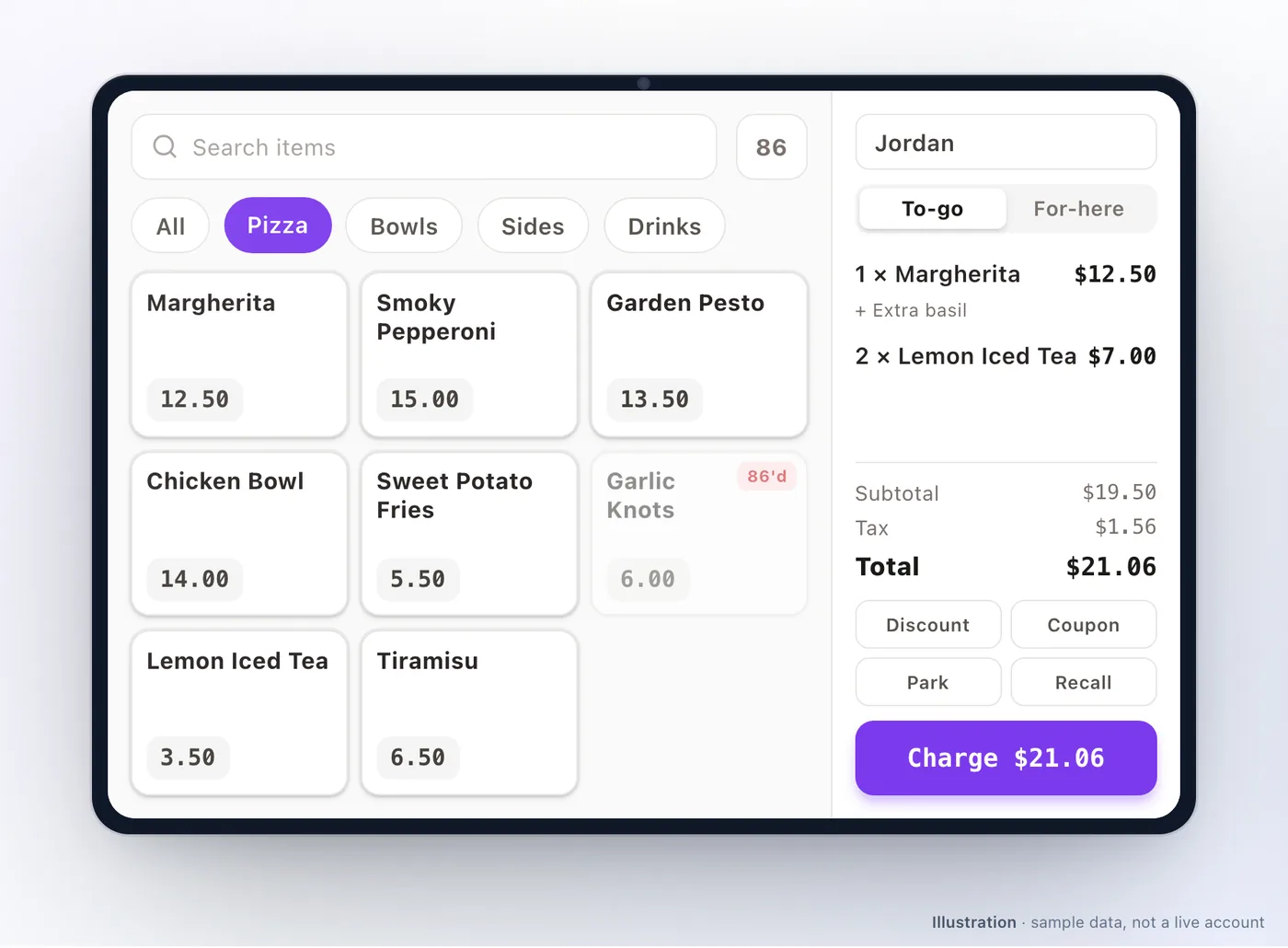
The register is the counter surface: it builds a sale, takes money in several forms at once, holds tables and tabs open, and reconciles a till at the end of a shift. It works from the same menu, customers and orders as every other channel.
Signing in
Section titled “Signing in”Staff pick their name and enter a PIN. There is no shared device login and no device admin PIN on the register — everything is attributed to a person, which is what makes the till and discount reports answerable. See Devices & staff PINs for managing staff and PINs.
Manager approval is a separate PIN prompt, not a separate login. Refunds and manual discounts ask a manager to approve at the moment of the action, and the approval is verified on the server, so it cannot be skipped on the device.
Taking a sale
Section titled “Taking a sale”Build the cart, edit lines, add modifiers and notes, then tender. A sale can be paid with several methods at once — part cash, part card, part wallet — and split by dishes or by guests.
| Tender | Notes |
|---|---|
| Cash | Calculates change and kicks the drawer |
| Card terminal | Integrated: the amount goes to the reader and the result comes back. See Card terminals |
| External card | Recorded only, for a standalone terminal you settle separately |
| Customer wallet | Spends the customer’s stored balance |
Loyalty works at the counter too: rewards, coupons, voucher codes and membership free items, with the customer found by phone number or by scanning their code.
Tables and tabs
Section titled “Tables and tabs”For table service the register carries a floor plan, open tabs per table, fired rounds and per-guest splits. The tables themselves — names, seats, sections and QR codes — are set up in Floor & Tables; the register draws where they sit.
A tab becomes a real order the moment its first round is fired, so every round reaches the kitchen display and the kitchen printers as it is sent, and the table shows up in reports while guests are still seated. Later rounds are added to the same order; nothing is charged until the check is settled.
- Courses — with the fine dine service style switched on for the outlet (its Order Flow section), each line belongs to a course and you fire one course at a time. Covers and server assignment are optional parts of the same mode.
- Checks — print a pro-forma check, split by guest or by dishes, and settle in several payments.
- Move and merge — move a party to another table, or merge two tables into one bill (needs a manager).
- Void a fired line — needs a manager, because the dish was already made.
- Captain handheld — servers can seat, order, fire and take payment from a phone on the floor, on the same tabs as the register; printing, refunds and the till stay on the register. See Captain handheld.
- Reservations — with reservations switched on, the register’s reservations view takes bookings and walk-ins and seats them. See Reservations.
The older charge first mode, where each round is paid as it is ordered, is still available per outlet for counter-style service.
Till sessions
Section titled “Till sessions”Open a till at the start of a shift with a counted float, record movements (pay-outs, drops, corrections) during it, and close it with a count at the end.
- An X report is a mid-shift read that does not close anything.
- A Z report closes the session and is the figure you reconcile against.
Till sessions are what turn “the drawer is short” into a specific shift, a specific person and a specific difference.
Other counter actions
Section titled “Other counter actions”- Parked orders — hold a sale and come back to it.
- 86ing — mark an dish unavailable from the register, optionally until a set time. See Availability.
- Prep time and pause — raise the promised time or stop online orders when the kitchen is buried, without calling anyone. See Prep time.
- Live orders board — New, Preparing and Ready lanes with an alert that keeps ringing until someone handles a new order.
- Order history — earlier orders by business day, with search, a full order view and a reprint.
- Decline — refusing an order goes through the server, so the refund and any coupon or reward reversal actually happen.
Deliberate limits
Section titled “Deliberate limits”Worth knowing before you plan around them:
- There is no offline ordering. Pricing and order placement are server-authoritative, exactly as on the kiosk. Fix connectivity first.
- Card refunds are completed at the terminal or in your gateway dashboard. The register records the refund; it does not push it to the card.
- Discounts are cart-level, not per line, and can require manager approval.
- Partial refunds do not reverse reward points.
Troubleshooting
Section titled “Troubleshooting”| Symptom | Try this |
|---|---|
| A staff PIN is rejected or locked | Reset it under POS Staff; repeated failures lock it briefly |
| A discount is refused | Manual discounts may be disabled, or require a manager PIN |
| Rounds are not reaching the kitchen | Check the register is online; a round is only sent once it is fired, not when it is added to the tab |
| The card reader is not responding | See Card terminals |
| The register cannot take orders | It needs a network connection — there is no offline mode |
| The till is short | Compare the Z report against the counted cash for that session |
| A refund did not reach the customer’s card | Complete it at the terminal or in the gateway dashboard, then reconcile in Refunds & disputes |
Related: Devices & staff PINs · Card terminals · Kitchen display · Captain handheld · Floor & Tables · Refunds & disputes
Was this page helpful?
This site uses a chat widget that sets a cookie so it can keep your conversation, and with your consent it measures page traffic. See the privacy policy.